
How can we help?
9. Managing Individuals (People Section)
Accessing the Individuals Section
Navigate to LineagePress > Individuals in your WordPress admin dashboard to access this section.
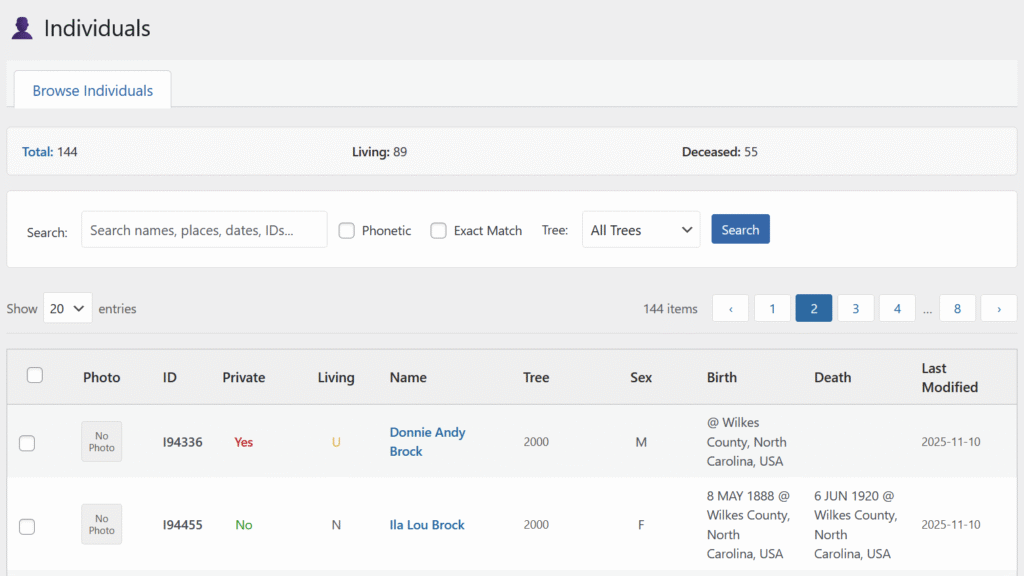
Overview of the Individuals Section
The primary view is the Browse Individuals page, which displays a comprehensive table of all people in your database, along with tools to manage them efficiently.
Browse Individuals
This page displays a detailed list of all individuals. You can use search and filter options to locate specific people or groups.
Table Columns
- Checkbox: Select individuals for bulk actions.
- Photo: Displays the individual’s profile picture (if available).
- ID: The unique identifier for the individual (e.g.,
I123). - Private: Indicates if the person is marked as private.
- Yes (Red): Private, some details hidden from public view.
- No (Green): Public.
- Click to toggle private status.
- Living: Indicates living status.
- Y (Green): Person is living.
- N (Gray): Person is deceased.
- U (Yellow): Status unknown.
- Click to toggle status (if applicable).
- Name: Full name of the individual. Clicking opens the public profile page.
- Tree: ID of the family tree the individual belongs to.
- Sex: Recorded sex (
M= Male,F= Female,U= Unknown). - Birth / Death: Birth and death dates and places. If private, shows “Private.”
- Last Modified: Date the record was last updated.
Searching and Filtering
- Search Box: Enter names, places, dates, or IDs to locate individuals.
- Phonetic Search: Matches names that sound similar.
- Exact Match: Matches only exact text.
- Tree Filter: Display individuals from a specific tree.
- Search Button: Apply filters.
- Clear Button: Reset filters to show all individuals.
Pagination and Display Options
- Show [X] entries: Select number of individuals per page (10, 20, 50, 100).
- Pagination Links: Navigate pages using “‹”, “›”, or specific page numbers.
Bulk Actions
Manage multiple individuals simultaneously:
- Select Individuals: Use checkboxes or “Select All.”
- Choose Action: Options include:
- Delete Selected: Permanently remove selected individuals (irreversible).
- Mark Private: Set selected individuals to private.
- Unmark Private: Set selected individuals to public.
- Mark Living: Explicitly mark selected individuals as living.
- Apply Button: Execute the chosen action.
Privacy Considerations
LineagePress includes robust privacy controls:
- Private Individuals: Hide details from public view to protect sensitive data.
- Living Individuals: Automatically identified based on dates and configurable age thresholds. Living individuals are typically restricted from public display.
Always review privacy settings to ensure compliance with your preferences and applicable regulations.