
How can we help?
⚙️ Configuration Settings Guide for LineagePress
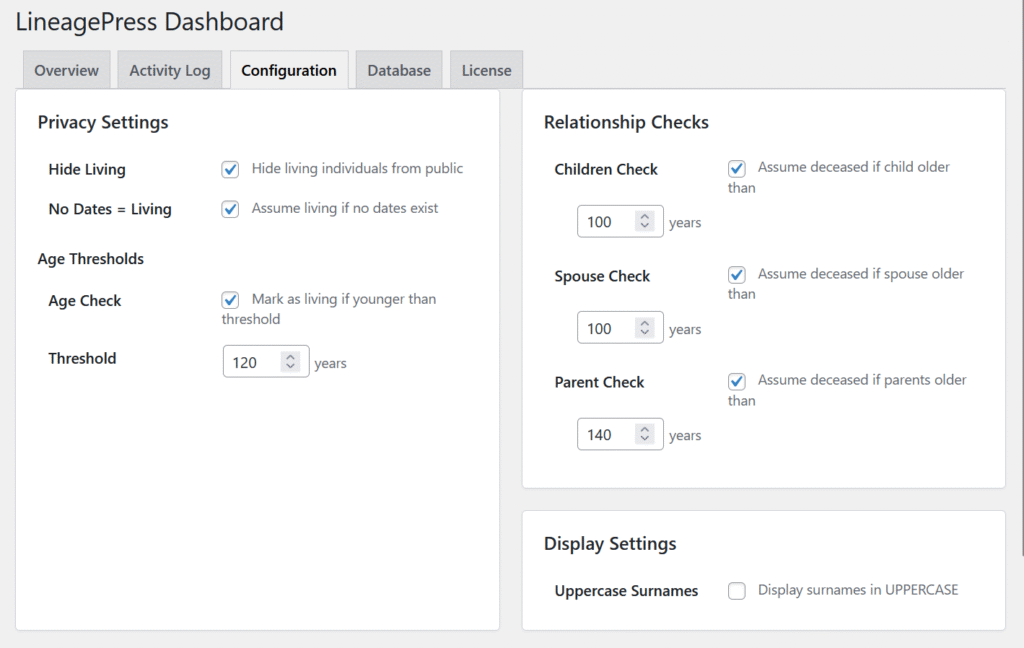
The Configuration page (accessible via WordPress Admin → LineagePress → Dashboard → Configuration Tab) is where you manage the privacy rules and display preferences that control how your genealogy data is presented on your public site.
1. Privacy Settings
These core settings are crucial for protecting the privacy of living individuals and are applied site-wide to all trees.
Core Privacy Options
| Setting | Default | Description |
| Hide Living | N/A | When enabled, any individual determined to be living is completely hidden from public view on all frontend displays (person pages, trees, search results). |
| No Dates = Living | Enabled | Conservative approach. Assumes any individual record without a birth or death date is currently living and hides them. If disabled, these individuals are shown as historical records. |
Age Thresholds
These checks use the birth date to estimate the current status.
| Setting | Default | Description |
| Age Check | N/A | Enables automatic determination of living status based on calculated age. |
| Threshold | 120 years | If a person’s calculated age (based on birth date) exceeds this limit, they are automatically assumed deceased and shown publicly. (Range: 1-200 years). |
Relationship Checks
Advanced checks that infer living/deceased status by examining related family members when direct dates are missing.
| Check | Threshold (Default) | Logic | Example Inference |
| Children Check | 100 years | If the person’s youngest child is older than this threshold, the parent is assumed deceased. | Parent (b. 1890, no death date) is shown if youngest child (b. 1920) is 105. |
| Spouse Check | 100 years | If the spouse’s calculated age exceeds this threshold, the person is assumed deceased. (Also useful if spouse has a death date). | Person (b. 1935, no death date) is shown if spouse died in 2018. |
| Parent Check | 140 years | Calculates theoretical parent age based on the person’s birth date. If the parents would be older than this threshold today, the person is likely deceased. | Person (b. 1870, no death date) is shown because parents would be years old. |
How Privacy Rules Work (Order of Precedence)
LineagePress applies checks in a strict order:
- Explicit GEDCOM Tags:
RESN PRIVACYor_PRIVtags always take precedence and hide the person. - Death Date: If a death date exists, the person is shown.
- No Dates Assumption: If enabled, hides people without any dates.
- Age Threshold: Checks calculated age against the set threshold.
- Relationship Checks: Checks children, spouse, and parent status.
If ANY of these rules determines the person is living, they are hidden.
2. Display Settings
| Setting | Description |
| Uppercase Surnames | Displays all surnames in UPPERCASE on the frontend (e.g., “John SMITH”). This is a common genealogy convention and is display-only; it does not modify the data in the database. |
Recommended Settings
| Profile | Hide Living | No Dates = Living | Age Check | Relationship Checks | Best For |
| Conservative | Public family trees with living relatives. | ||||
| Moderate | Most general-purpose genealogy websites. | ||||
| Permissive | Historical societies or archived records. |
Important Notes
- Administrators always see all records in the WordPress admin area.
- Privacy settings do not modify the underlying database records.
- It is recommended to log out and visit the frontend after saving changes to verify that living individuals are correctly hidden.